03 Enterprise Intelligence
What your organisationknows, put to work.
The Enterprise Intelligence Platform. Cortex, the desktop AI workspace, is where you ask. The company brain, an evidence-backed graph you host, is designed to answer.
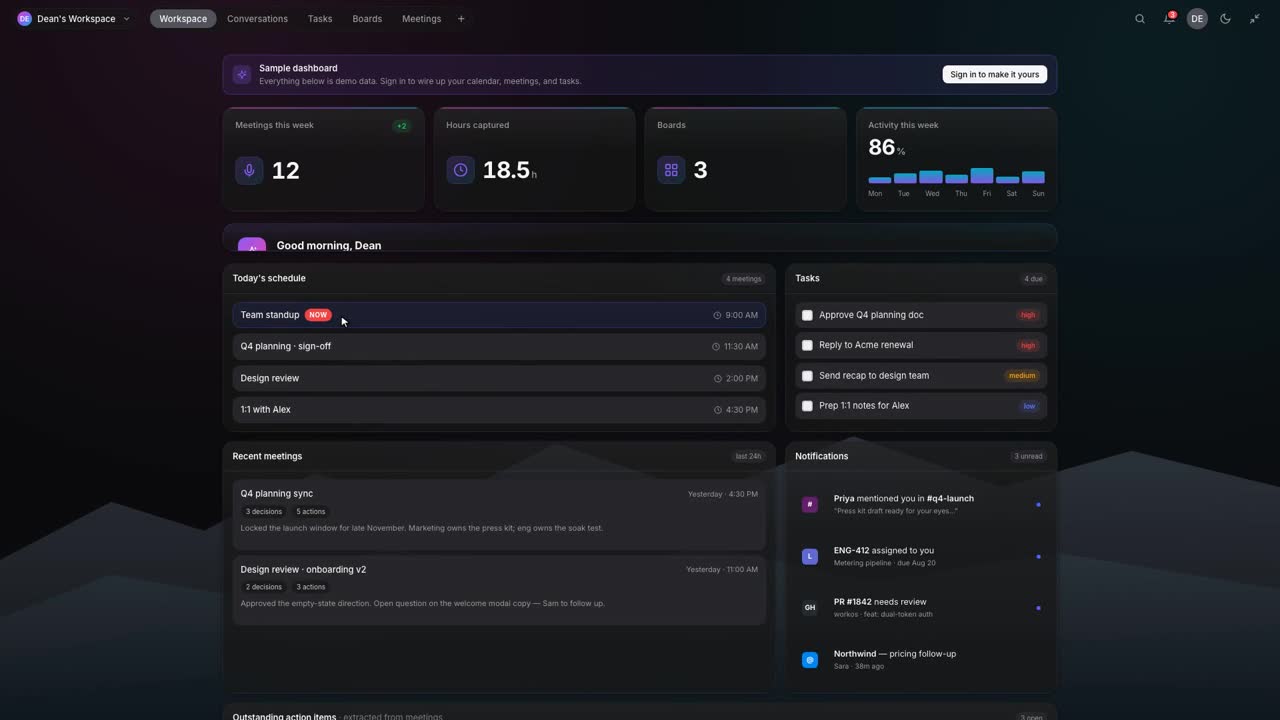
[ 03 ] Enterprise IntelligenceAsk. Analyse. Build.
01 In this layer
The Enterprise Intelligence Platform.
- Desktop AI workspaceAvailable
- Directory data into a graph you hostAvailable
- Analyse and visualiseDesigned for
- Build an agent from a findingAvailable
Cortex
CortexHow we build with CortexCompany brain
Company brainEnterprise graphData & ContextCustom models
Custom modelsSwfte safety-first modelIntelligence & ModelsData preparationDomain fine-tuningEvaluation and safetyDeploy and serveOwn your modelAnalyse, visualise, build
Swfte Enterprise IntelligenceEnterprise graphDeployment modesAnalyseVisualiseBuild agentsBuild workflowsBuild solutionsAI observabilityUsage and cost analytics02 [ 03.A ]
Ask the organisation, not a search box.
Cortex answers from the knowledge you connect, with local models when work must stay on the laptop.
03 [ 03.B ]
Every fact carries its evidence.
The enterprise graph marks each fact observed, corroborated, verified, inferred, stale, disputed or unknown, with history you can read as of any date.
04 [ 03.C ]
Answers that respect who is asking.
Access is checked against the caller, a person or an agent, before anything is read.
05 See it work
Cortex, result by result.
Ask Cortex
What did we decide in the pricing review, who owns the follow-ups, and can you turn it into a weekly check?
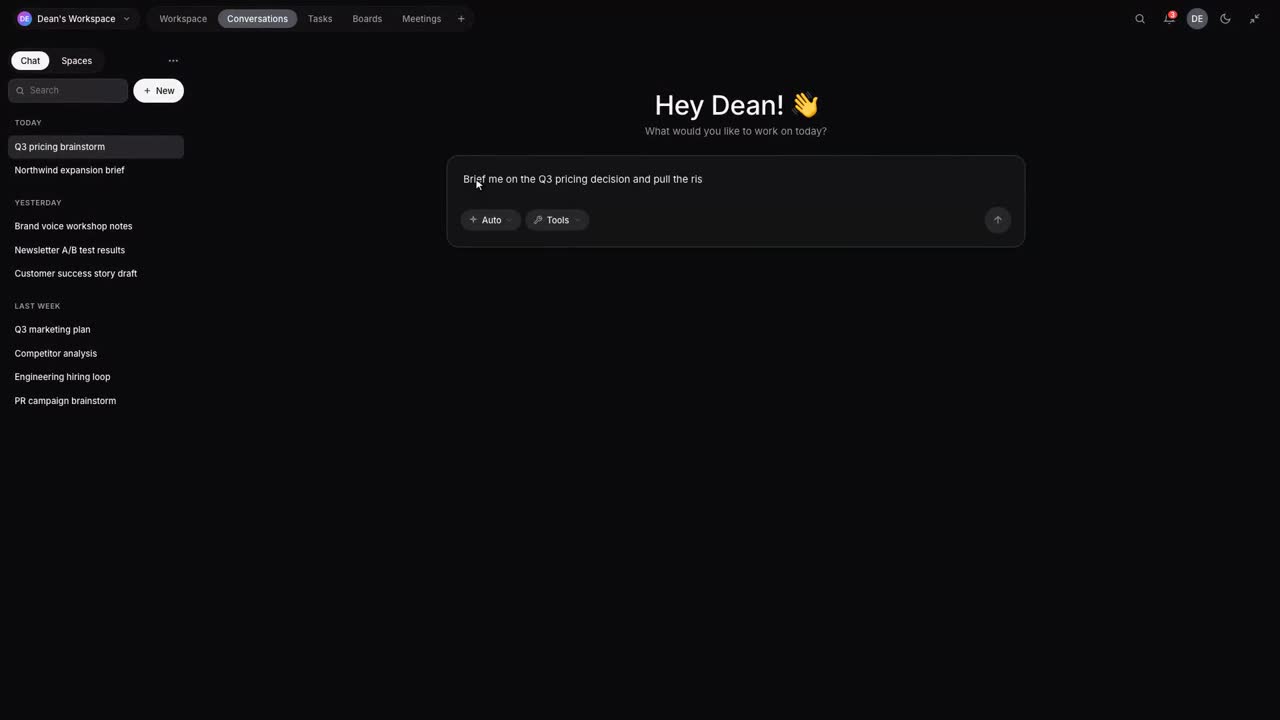
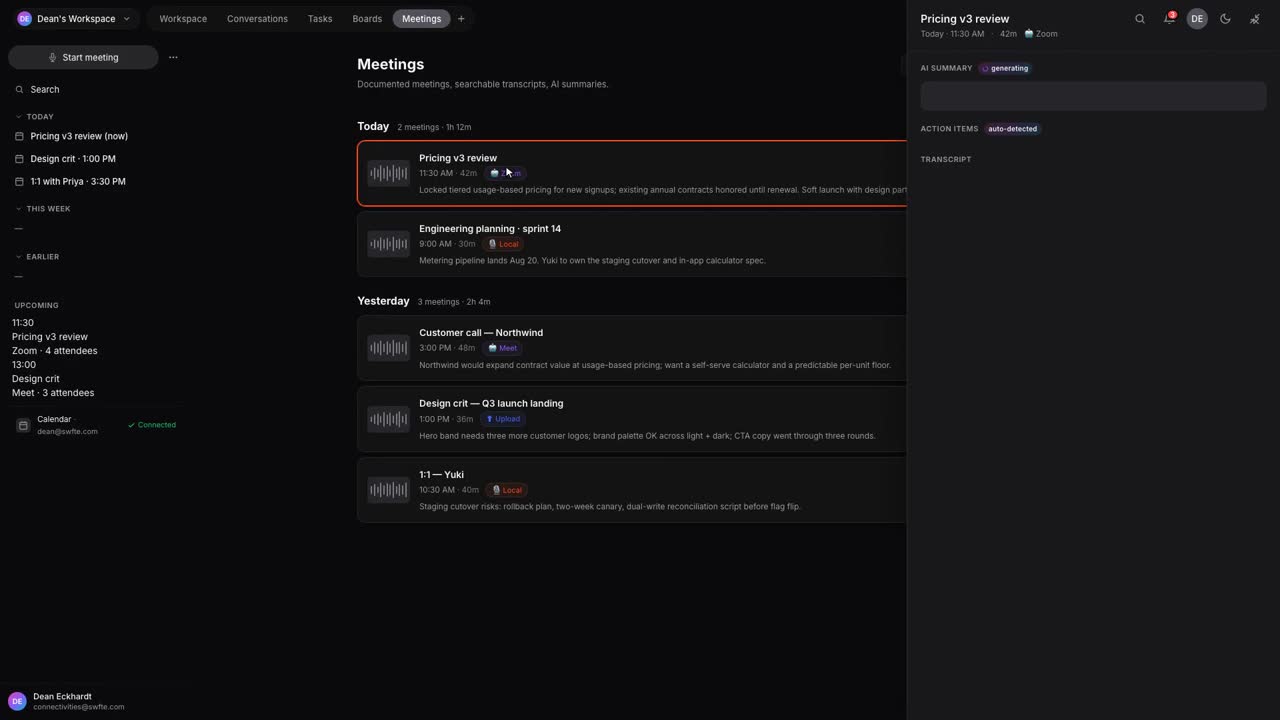

[ 05.A ] Excerpts from the Cortex trailer. Muted, looped, captions on request.
06 Agent thread
Ask the source of truth.
A person, or an agent, asks a question. Before anything is read, access is checked against whoever is asking. The answer cites its sources and says how sure each fact is.
- AvailableCortex, the directory graph with its history, and the seven evidence statuses on facts.
- Designed forPer-caller access checks across documents and tickets, document and ticket connectors, answers inside Cortex, and the approval action.
Illustrative example with a fictional company. Not a real customer, not real data.
/askWho approves EU refunds over the threshold, and has that changed this quarter?
I will check what you are allowed to see, then answer from the enterprise graph and the policy library.
- Checked identity and accessyou can see 3 of 4 sourcesDesigned for
- Read the enterprise graph: owners, systems, historyowners and reporting linesDesigned for
- Pulled the policy documentverified · Refund policy v4Designed for
- Cross-checked ticket historycorroborated · 3 ticketsDesigned for
- Flagged one stale factstale · 41 daysAvailable
Answer
Refunds over the threshold for EU customers need approval from Finance Operations [1]. The policy owner is Maria Lind, Head of Finance Operations [2]. The threshold was added this quarter [3], and the last three refund tickets followed it [4]. The backup approver named in the policy, Tom Berg, left 41 days ago [5].
- [1]Refund policy v4 verified
- [2]Enterprise graph: reporting line observed
- [3]Policy version history inferred
- [4]Ticket history corroborated
- [5]Directory: account disabled stale
Sources checked
- DirectoryReadable
- Policy libraryReadable
- TicketingReadable
- HR recordsNo access
Why one fact is stale
The directory shows the backup approver’s account was disabled 41 days ago. The policy still names him.
AvailableThe backup approver needs replacing. Shall I ask Maria Lind to update the policy?
Designed for/askBefore I route ticket FIN-2231: who approves EU refunds over the threshold?
I will check what this agent’s identity may read, then answer from the source of truth.
- Checked the agent’s identity and scopescoped to the agent: 2 of 4 sourcesDesigned for
- Read the enterprise graph: owners, systems, historyroles only, names withheldDesigned for
- Pulled the policy documentverified · Refund policy v4Designed for
- Cross-checked ticket historyout of scope for this agentDesigned for
- Flagged one stale factstale · 41 daysAvailable
Answer
Refunds over the threshold for EU customers need approval from Finance Operations [1]. Route the ticket to the Finance Operations approver group [2]. The named backup approver is no longer active [3], so the group queue is the safe route.
- [1]Refund policy v4 verified
- [2]Enterprise graph: role, not person observed
- [3]Directory: account disabled stale
Sources checked
- DirectoryReadable
- Policy libraryReadable
- TicketingNo access
- HR recordsNo access
Why one fact is stale
The directory shows the backup approver’s account was disabled 41 days ago. The policy still names him.
AvailableRoute FIN-2231 to the Finance Operations approval queue?
Designed forWhat the Swfte Intelligence Platform is
Most analytics tools stop at a chart. Most agent builders start from a blank canvas. The Swfte Intelligence Platform is designed to join the two: you look at your organisation, and from the thing you are looking at you build the response.
Underneath is Swfte Enterprise Intelligence, a customer-hosted appliance that holds a continuously updating, time-aware graph of your organisation: people, groups, reporting lines and accounts today, with systems, services, documents, decisions and ownership on the roadmap. Every fact carries an evidence status, so the platform can say the difference between what it has seen, what it has inferred and what it does not know.
It is also honest about coverage. The platform reports what it has connected and what it has not, and it never claims to understand everything.
Analyse: ask questions of your own data
Designed so that an analyst can ask a question in plain language and get an answer with its sources, its evidence status and its age attached.
- Natural-language questionsAsk who reports to whom, who is in a group, who owned something last March. Answers come from the graph and carry their evidence.
- Structured explorationWalk the graph from a person, a group or a system outward, and read it as it was at an earlier time.
- Trends and anomaliesDesigned to flag what has changed against its own history: usage, cost, policy decisions, ownership gaps.
- Identity-aware by defaultThe answer is limited to what the person asking is allowed to see.
Visualise: see the organisation, not just a table
Designed so that the same graph can be drawn in the shape that fits the question.
- Graph explorerNodes and relationships, with the evidence status of each relationship visible.
- Org and ownership mapsReporting lines, group membership and, as collectors arrive, service and system ownership.
- As-of timelinesScrub back to see who was in a group, or who owned a thing, at a point in time.
- Agent and workflow mapsWhich agents exist, what they may touch and who owns them.
- Coverage and evidence viewsWhat is connected, what is stale, what is disputed.
- DashboardsUsage, cost and outcome dashboards.
Build from insight: the finding becomes the starting point
Designed so that what you see can become what you run, without starting again from a blank page.
- Turn this chart into an agentThe metric, the owner and the permitted systems carry across into a new agent and its Trust Profile, starting at L1 Assist.
- Turn this finding into a workflowA pattern becomes a workflow with its trigger, its routing and its approval steps drawn from the graph.
- Package it as a solutionAgents, workflows, dashboards and policies together, with the outcome measure attached.
Agents and workflows are built in Studio, Cortex and Nexus. They read organisational context from the graph and act only through typed, approved and audited capabilities. The wiring between them and the graph is on the roadmap.
Governance at runtime, inside the platform
Governance is not a separate screen. It is built so that identity, permissions, policy, audit and human approval apply to what you build from an insight, and to the questions you ask in the first place.
- IdentityEvery person, agent and workflow acts as a known identity. An agent never has more access than the person who asked.
- PermissionsScoped to each identity, tool and data source. A policy change alters what an agent can actually do.
- AuditA tamper-evident record of what was asked, what was read, what was decided and what was done.
- Human approvalConsequential actions wait for a named approver. Autonomy rises by level, on the record: L1 Assist to L5 Adaptive.
Evidence statuses: what the platform knows, and how well
Every fact in the graph carries one of seven statuses, and the status travels with the answer.
- ObservedSeen directly in a source system.Good enough to show and to ask about. Not yet confirmed by anything else.
- CorroboratedMore than one independent source agrees.A stronger basis for a recommendation than a single observation.
- VerifiedConfirmed by an authoritative check or a person.The kind of fact an approval rule can safely lean on.
- InferredDerived from other facts rather than seen directly.Useful for suggestions. Labelled as an inference wherever it is shown.
- StaleNot re-observed within its freshness window.Shown with its age. A workflow can be told to ask a person instead of relying on it.
- DisputedSources disagree about it.Surfaced as a conflict to resolve, not silently averaged away.
- UnknownNo evidence either way.Said plainly. The platform does not fill gaps with a guess.
Deployment modes
Where the platform runs is a configuration choice. It decides what, if anything, leaves your environment.
- ConnectedThe appliance runs in your environment and links outbound to the Swfte control plane.Leaves your environment: Health counts, coverage summaries, diagnostics and command results. Personal and restricted data stay in your environment.
- PrivateThe same link behaviour, pointed at a control plane that you host yourself.Leaves your environment: The same as connected, to a control plane you operate.
- Air-gappedNo outbound connection at all.Leaves your environment: Nothing leaves. The link is never started, and enrolment is refused.
What connects today, and what comes next
Built means it exists in the appliance. Designed means an intended design on the roadmap, not something to rely on today.
- BuiltDirectory sources: Active Directory / LDAP, Microsoft Entra ID, Okta, Google WorkspacePeople, groups, reporting lines and accounts, read with a read-only account. Passwords and credentials are never read or stored.
- BuiltIdentity resolution into people and org structureAccounts across directories are resolved into people, with the resolution evidence kept on the link.
- BuiltTime-aware graph storeInsert-only history, as-of reads, evidence statuses on facts, tenant isolation and a hash-chained audit log.
- BuiltLocal API for graph, people, groups, coverage and auditToken-scoped, with the tenant always taken from the credential, never from the request.
- BuiltOutbound link: enrolment, mutual TLS, signed commands, kill switch, outbox, signed updatesCustomer-killable, and absent entirely in air-gapped mode.
- BuiltPackaging: container image, installer, Helm chartVirtual machine with Docker, Kubernetes via Helm, and an air-gapped route.
- In progressPre-model sanitisation gatewayDesigned to clean content before it reaches a model.
- Designed forCloud, code, CI/CD, Kubernetes and database collectorsOn the roadmap. This is what lets the graph answer who owns a service, not only who a person is.
- Designed forSaaS, business-system and document sourcesOn the roadmap.
- Designed forContext-package API and MCP serverOn the roadmap. Designed so an agent can ask for the context it is allowed to have.
- Designed forAction gateway with approvalsOn the roadmap. Designed so agents act only through typed, approved and audited capabilities.
- Designed forProduction control planeOn the roadmap.
- Designed forCloud marketplace deliveryOn the roadmap.
- Designed forWiring into Cortex, Nexus, Studio and the Nexus harnessOn the roadmap. Each is designed to read organisational context from the graph.
- Designed forGraph explorer, org and ownership maps, as-of timelines, coverage and evidence viewsThe local API already serves the data these views read: the subgraph, as-of reads, coverage and evidence. The views themselves are design intent.
Who uses it
One surface, several readers. Each sees the same evidence.
- AnalystAsk a question, see the evidence behind the answer, and share the view that supports it.
- AI teamBuild, deploy and govern agents and workflows from findings you can trace back to their source.
- CISOGive AI identity, permissions, policies and auditable controls.
- COOTurn AI into operational execution.
Go deeper
Nine pages, each with its own question.
- AnalyseAsk a question of your own data and get an answer that says where it came from, how sure the platform is, and how old it is.Open
- VisualiseSee the graph as a map, a timeline or a dashboard, with the evidence behind every line still visible.Open
- Build agents from insightTurn this chart into an agent: the metric, the owner and the permitted systems carry across, and the agent starts under limits.Open
- Build workflows from insightWhen the response to what you saw is a process, the pattern becomes a workflow with its trigger, routing and approvals drawn from the graph.Open
- Package solutions from insightAgents, workflows, views and policies, bundled together with the outcome they are meant to move.Open
- AI observabilitySee what your agents and workflows did, step by step, with the cost, the policy decisions and the evidence attached.Open
- Usage and cost analyticsKnow who is spending what on which model, set limits that act, and turn a spend anomaly into a governed response.Open
- The enterprise graphA customer-hosted graph of people, groups, reporting lines and accounts today, with systems, services, documents and decisions to follow.Open
- DeploymentRun the Intelligence Platform in your environment, choose what leaves it, and cut the link whenever you decide to.Open
Frequently asked questions
What is the Swfte Intelligence Platform?
It is the intelligence surface of the Sovereign Intelligence Platform: a place to analyse and visualise your data, usage, agents and outcomes, and then build agents, workflows and solutions from what you see. It is built around a customer-hosted, time-aware graph of your organisation, with governance running underneath.
Is this a business intelligence tool?
It overlaps with one, but it is designed for a different job. A business intelligence tool ends at the chart. This is designed to carry the chart forward into an agent, a workflow or a solution, under the same identity, policy and audit controls as everything else on the platform.
Where does my data live?
In your environment. Customer data stays there by default, and the appliance runs on a virtual machine, on Kubernetes, or air-gapped. Personal and restricted data are local-only by default, and secrets and credentials are never stored.
What does it connect to today?
Today the appliance reads directory data from Active Directory and LDAP, Microsoft Entra ID, Okta and Google Workspace, and resolves accounts into people and org structure. Cloud, code, Kubernetes, database, SaaS and document sources are on the roadmap. The table on this page lists what is built and what is not.
Does it send my data to Swfte?
In connected mode the appliance sends health counts, coverage summaries, diagnostics and command results over an outbound link that you can cut with a local kill switch. Personal and restricted data stay in your environment. In air-gapped mode nothing leaves.
Can an agent built from an insight act on its own?
Only within the limits you set. New agents start at L1 Assist or L2 Approve, and autonomy increases by level as the record shows it has earned it. Consequential actions wait for a named approver.
Is the platform compliant?
We do not claim that, and no platform can on its own. It is built for compliance-by-design: it provides the technical controls, governance mechanisms and evidence needed to deploy AI within an organisation’s applicable regulatory, security and policy requirements. The exact posture depends on your use case, jurisdiction, deployment and configuration. Swfte does not hold a SOC 2 report, an ISO 27001 certificate or a HIPAA BAA today. A SOC 2 Type I audit is in preparation; the trust page lists what is in place and what is in progress.
What does it cost, and when is it available?
Talk to our team for the current position.
Across every layer
These ideas apply to every layer of the platform.
- Controlled autonomyFive levels, from AI that recommends to AI that adapts within limits.Open
- Trust ProfileThe record that describes what each AI system is and may do.Open
- AI sovereigntySeven kinds of control over your AI estate.Open
- AI governanceGovernance that runs inside AI, not beside it.Open
- Company brainOne governed place for everything your organisation knows, for every product to read from.Open
- Custom modelsModels adapted on your own data, evaluated before release and deployed under your control.Open
- How Swfte builds with CortexAn honest first-party account of how we build, review and approve work, labelled by status.Open
- Governed agentsIdentity, permissions, policy, approvals and audit for agents, with ten templates.Open
- Compliance-approved workflowsWorkflows with approval gates and evidence built in, with twelve templates.Open

[ 07 ] One platform
Capability and control, in one platform.
Start with one layer and prove it. Add the next when you are ready. The controls come with you.