


 OpenAI LiveConnected
Bring your own key
01 Inference
Connect puts one API in front of 50+ model providers, routes every request by your rules, fails over when a provider is down and stops spending at the caps you set.
[ 01 ] InferenceRoute. Fail over. Cap spend.
01 In this layer
03 SEE IT WORK
Universal keys
Issue keys from the Access page. By default a key reaches every provider your workspace has connected; narrow it when you need to. Secrets are shown once, rotate without downtime, and disappear when the person leaves.
02 [ 01.A ]
One OpenAI-compatible API in front of 50+ model providers. Switch, route and fall back without rewriting the application.
03 [ 01.B ]
Fallback chains move a request to the next model when a provider is down or rate-limited.
04 [ 01.C ]
Run open and private models in your own environment behind the same gateway. Self-deploy is on request.
[ 01.D – 01.O ] INSIDE CONNECT
Twelve chapters, each a real screen from the console, assembling as you scroll.
D1 [ 01.D ]Universal keys
Issue keys from the Access page. By default a key reaches every provider your workspace has connected; narrow it when you need to. Secrets are shown once, rotate without downtime, and disappear when the person leaves.
AvailableD2 [ 01.E ]Providers and gateway
Connect providers with your own credentials, or run on Swfte credits. One base URL speaks the OpenAI, Anthropic and Responses protocols, and only routes you've allowed are exposed. Your own keys are never billed twice.
AvailableD3 [ 01.F ]Models and fleet
Filter the catalogue by what a model can do, deploy open models on your own GPU pools, and wire in MCP servers. Everything your workspace runs sits in one fleet view.
AvailableD4 [ 01.G ]Routing
Draw the path on a canvas: conditions on spend, tokens, error rate or time of day, and an ordered chain of models for each branch. Then test a request against your draft and see exactly which rule fires, before anything is spent.
AvailableD5 [ 01.H ]Controls
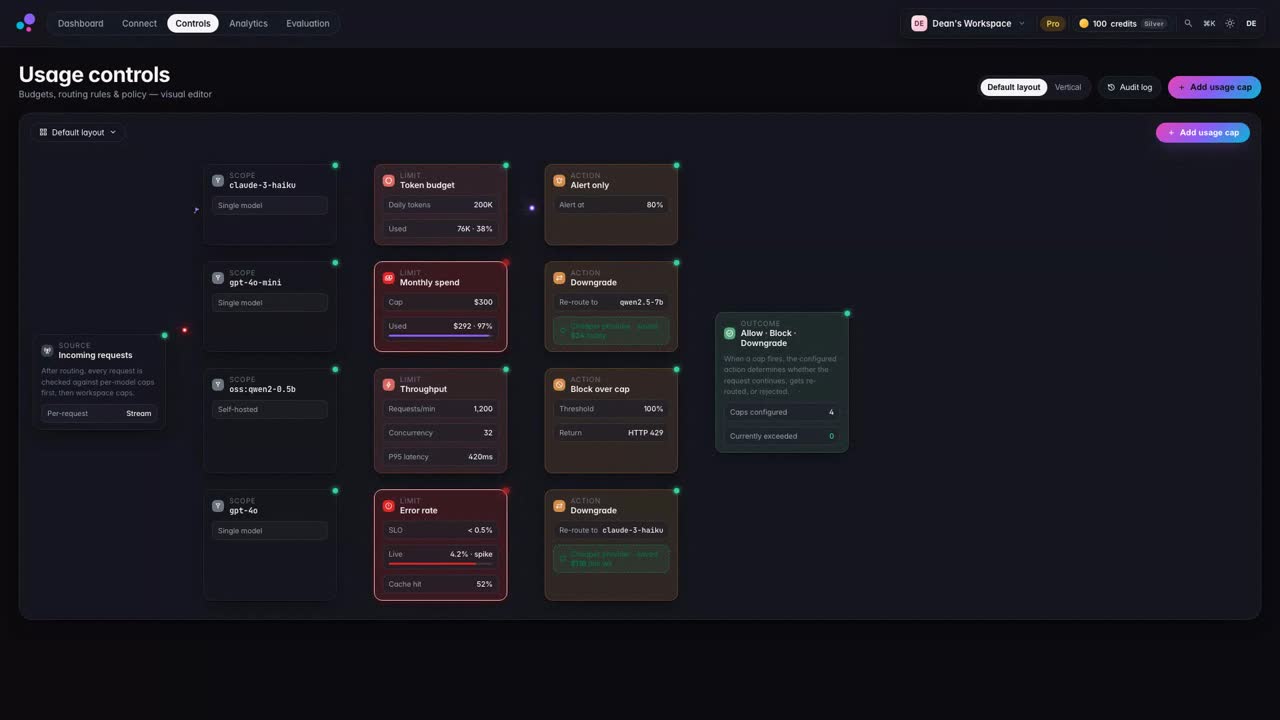
Cap spend and tokens for the workspace, a model, a person or a single key. Block, downgrade to a cheaper model, or just alert. Every setting says whether the gateway enforces it. If rules can't be read, credit-funded requests stop before a provider call.
AvailableD6 [ 01.I ]People and seats
Team and Enterprise workspaces share licensed seats. Invite people with a role, watch the pool fill, add seats when needed. Owners get the whole console; members get a simple read-only view of their own keys, usage and limits.
AvailableD7 [ 01.J ]Analytics and reports
Define your own dimensions (Team, Department, Cost centre, Client) and put people in groups. Then pivot spend and tokens by person, group, key, provider, model or tool, drill in, compare periods, and export the exact view as CSV, Excel or an offline report.
AvailableD8 [ 01.K ]Evaluation
Send the same prompt, image or audio to two models and compare the answers, cost and latency. Save the cases that matter to you as test suites and rerun them whenever you change a rule or a model.
AvailableD9 [ 01.L ]Coding agents and SDKs
Copy a setup snippet for Claude Code, Codex or your SDK, swap in your Swfte key, and requests go through your rules. Connect tags requests by tool, so you can see usage by tool, by person and by team.
D10 [ 01.M ]Built to be trusted
Only the routes you allow are exposed. Secrets are shown once. When something can't be loaded, Connect says so instead of showing a number it made up, and it stops you acting on the wrong workspace.
D11 [ 01.N ]Across industries
Whatever you build, the building blocks are the same: keys per person, caps per group, routes per workload, and reports in the shape your business already uses.
D12 [ 01.O ]Why Connect
One gateway, one console, the controls finance and security ask for, and a view people actually understand.
Connect fornece um único endpoint de API compatível com o formato OpenAI. Você pode alternar entre mais de 50 modelos alterando um único parâmetro.
Connect roteia automaticamente as solicitações para o modelo mais econômico que atende aos seus requisitos de qualidade. Em média, os clientes economizam 40% nos custos de API.
Sim! Você pode trazer suas próprias chaves de qualquer provedor, ou usar o acesso compartilhado da Swfte para faturamento simplificado.

[ 06 ] One platform
Start with one layer and prove it. Add the next when you are ready. The controls come with you.
One gateway, every provider, per-token cost visibility. Swap models without touching your code.


