WorkflowInternal
Claims intakeUpdated today- Configured
- Record exists
- Provisioning
- Not in progress
- Running
- Lifecycle says up
- Reachable
- Workspace only
- Authorization
- Not reported here
- Health checked
- No check reported
2 of 6 unverified from this list.
04 Studio
Build agents and workflows visually or by describing them. Policies decide what they may do, and a person takes over when it matters.
[ 04 ] StudioBuild. Govern. Run.
01 In this layer
03 SEE IT WORK
Describe it
Choose what you are building, from an agent or workflow to a journey, chatflow, widget or MCP server, and describe the job. Studio names each phase while it drafts, checks and saves, then hands you a draft to review.
02 [ 04.A ]
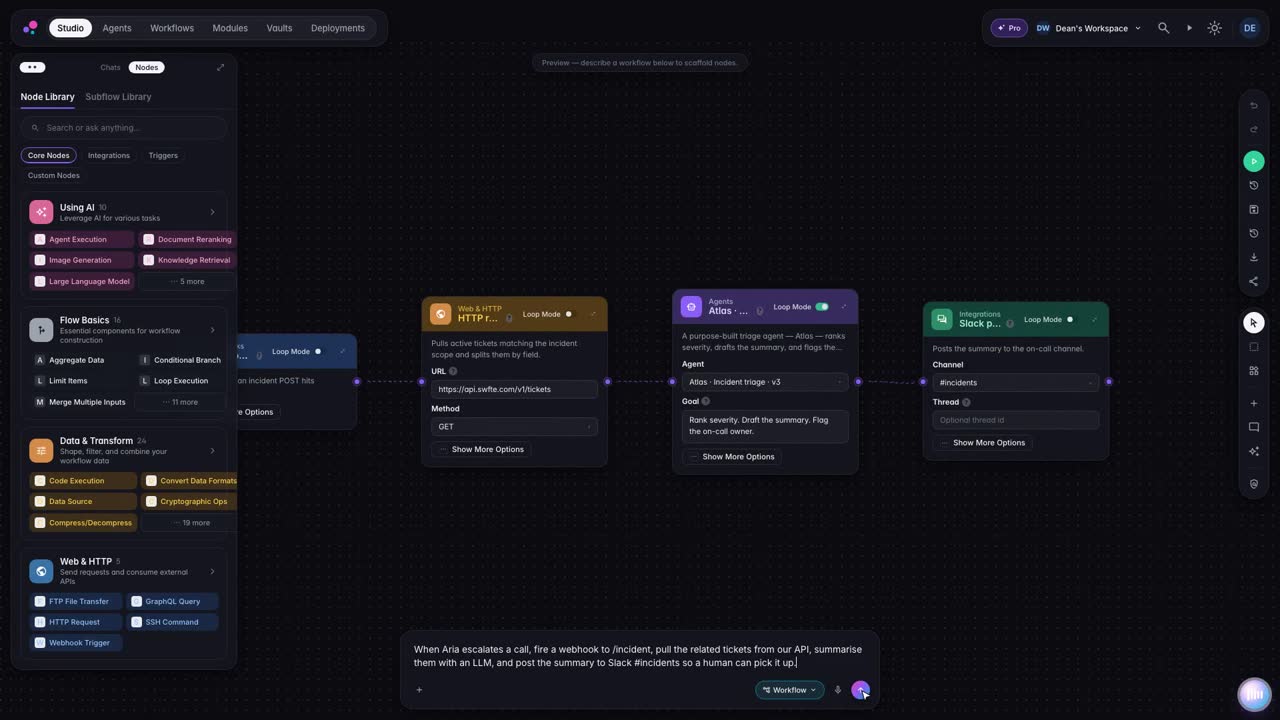
Describe the job. Studio assembles the steps from building blocks you can inspect and change.
03 [ 04.B ]
Approval steps pause the run until someone decides. A gate never approves itself.
04 [ 04.C ]
Each run is written to a run ledger you can read and verify.
[ 03.A – 03.L ] INSIDE STUDIO
Twelve chapters, each a real screen from the console, assembling as you scroll.
S1 [ 03.A ]Describe it
Choose what you are building, from an agent or workflow to a journey, chatflow, widget or MCP server, and describe the job. Studio names each phase while it drafts, checks and saves, then hands you a draft to review.
AvailableS2 [ 03.B ]Workflow canvas
Each node says what it is, what it takes in and where its output goes. Typed ports carry data along the edges, a condition splits the path in two, and a failure can follow its own error route.
AvailableS3 [ 03.C ]Node library
AI steps, flow logic, data tools, triggers and connected services sit in one searchable library. Drop a block onto an edge and it slots in between. Save a configured node and your whole team can reuse it.
AvailableS4 [ 03.D ]Configure a step
Pick a credential and an operation, pull in another step's output, and decide what happens if it fails. Then run only that step with a test input and read its result on the card before you run the rest.
AvailableS5 [ 03.E ]Test run
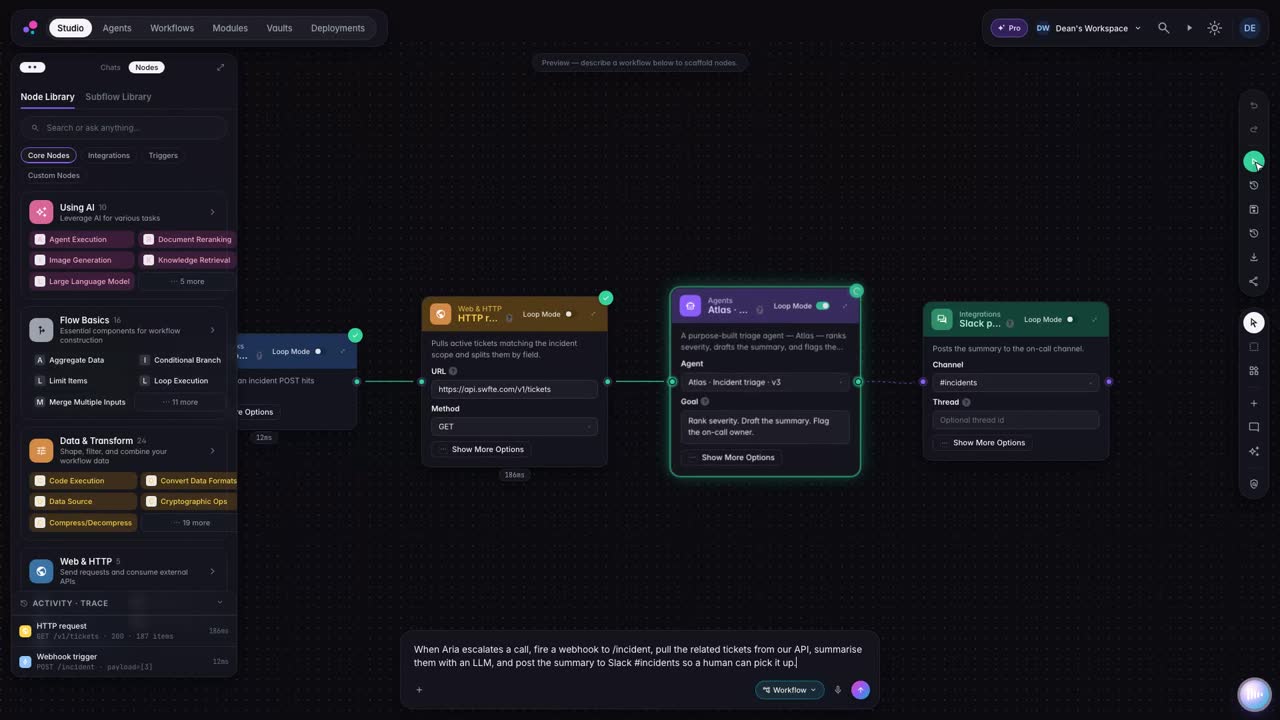
Start a test run and every node reports its state as it goes, with activity grouped by step. When one fails, the drawer shows which step and why, and Retry starts the run again once it is fixed.
AvailableS6 [ 03.F ]Human approval
When a run reaches a gate it pauses and shows the exact action the agent wants to take. The reviewer approves it, edits it and approves the edited version, or denies it, and the run carries on from that decision.
AvailableS7 [ 03.G ]Agent canvas
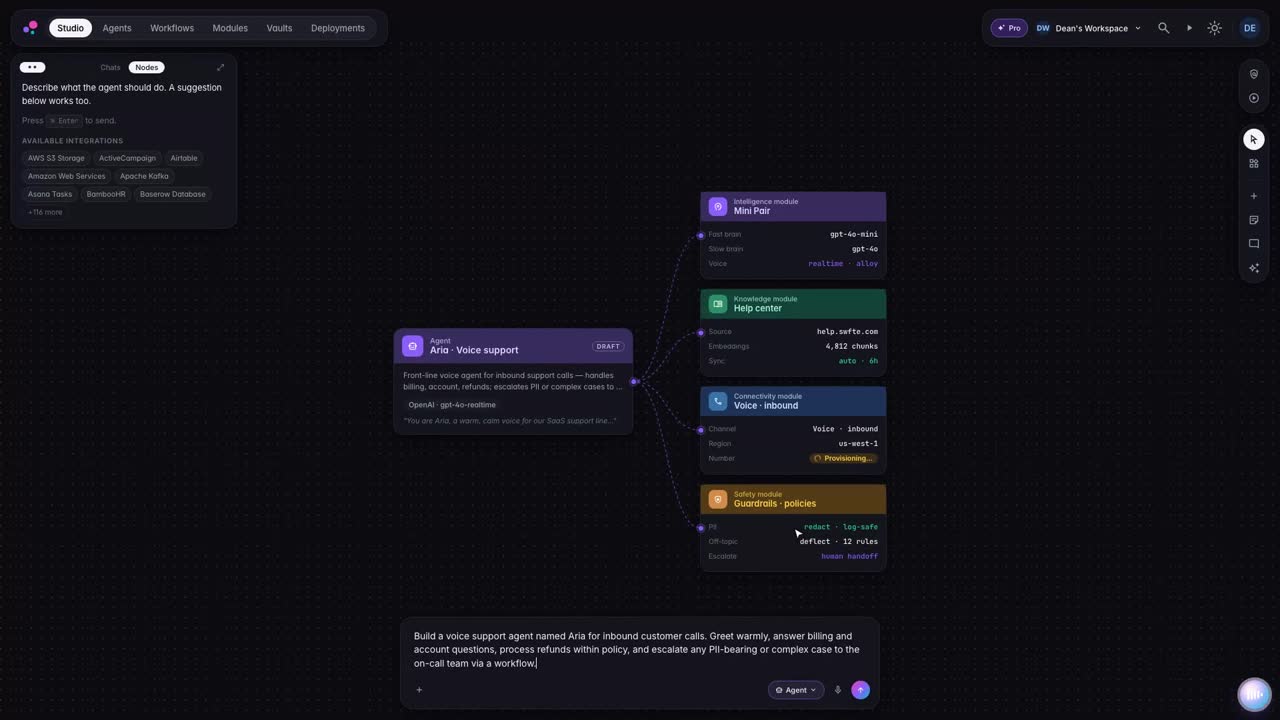
Model, instructions, knowledge, tools and channels each have a place on the agent canvas. Attach a source or a tool where it belongs, then run the tree audit to see what is still missing before anyone talks to it.
AvailableS8 [ 03.H ]Knowledge bases
Upload documents to a knowledge base and follow each one through parsing, cleaning, splitting and indexing. Then ask a test question and see which passages come back, and how closely they matched, before an agent relies on them.
AvailableS9 [ 03.I ]Run ledger
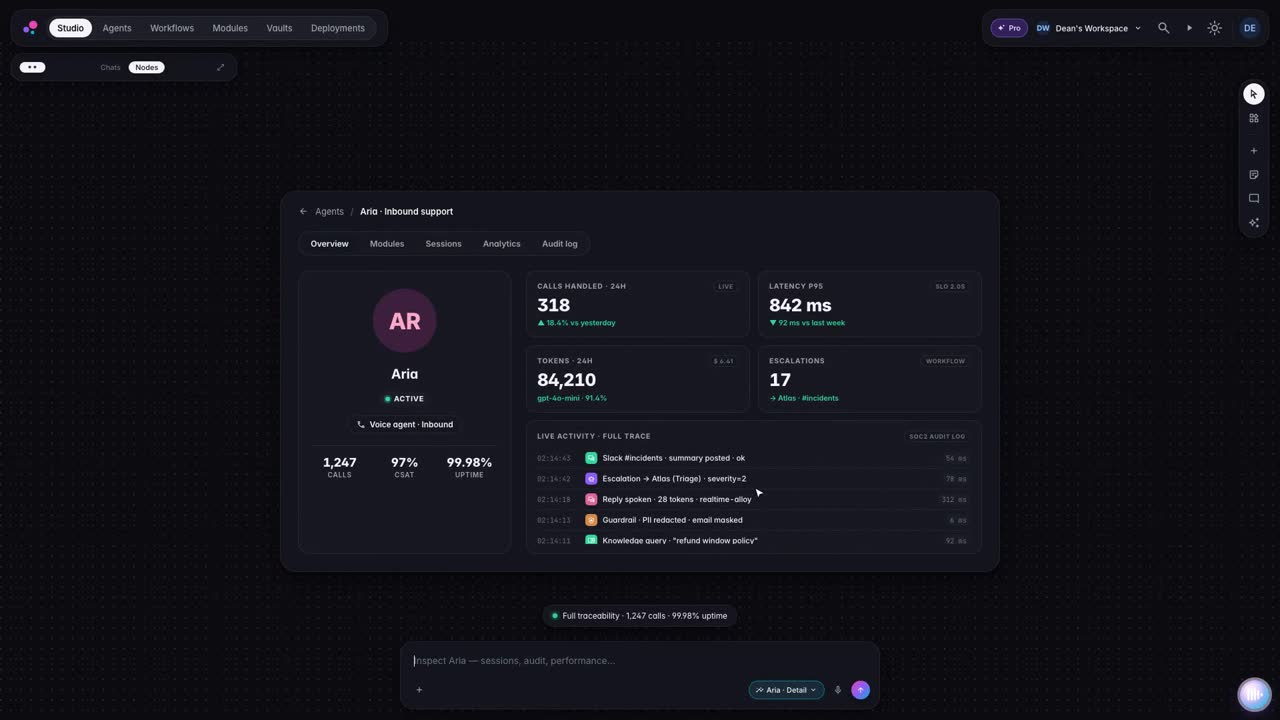
The run ledger lists workflow, agent and worker runs with a plain outcome for each, failures included. Open a run's trace to read every event in sequence and see whether its hash chain verifies.
S10 [ 03.J ]Deploy
Publish a version, then deploy it with the target, size, estimated cost and runtime mode in front of you. Watch it come up phase by phase, and see each deployment's facts kept apart, including the ones not yet known.
AvailableS11 [ 03.K ]Across industries
The blocks that build, pause, record and ship work are the same in every team. The scenarios below are illustrations, not customer deployments.
S12 [ 03.L ]Why Studio
One workspace takes work from a sentence to a deployed service, with a person in the loop where it matters and a readable record of every run.
Where Nexus is connected, Checks lists its findings for review.
Illustrative demo
How it works
Say what the agent should do. Studio assembles the workflow from building blocks you can inspect and change.
Guardrails keep private information out and the agent on topic. Policies apply at runtime on runs that have one attached.
When a conversation needs a human, the agent passes it on with a summary, and your team takes it from there.
Step inside any agent: every conversation and every action, recorded for the people who answer for it.
06 Agent thread
One sentence becomes a workflow with its systems, an approval gate and a policy, tested before it goes live.
Illustrative example with a fictional company. Not a real customer, not real data.
/new-workflowRoute refund requests over the threshold to finance for approval
I will draft it, connect your systems and test it before anything goes live.
No card data in prompts. Runs stay in the EU region. Refunds over the threshold wait for a person.
Designed forReady to publish. Refunds over the threshold will wait for Finance Operations.
AvailableSwfte Studio ti permette di creare agenti AI, chatflow conversazionali, workflow automatizzati ed esperienze multicanale. Dai bot di supporto clienti all'automazione delle vendite, dall'elaborazione documenti all'analisi dati—se coinvolge l'AI, puoi costruirlo in Studio.
Studio templates give you a starting point, and the time to a first working agent depends on your use case, data and integrations. For custom enterprise solutions, we scope timelines with you.
Nessuna programmazione richiesta! Studio è progettato per tutti—dagli utenti aziendali agli sviluppatori. L'interfaccia visuale drag-and-drop rende la creazione di esperienze AI semplice come assemblare blocchi.
Studio si connette a oltre 100 strumenti pronti all'uso: Salesforce, HubSpot, Slack, Microsoft 365, Google Workspace, GitHub, Zendesk, Notion e molti altri. Inoltre, la nostra API ti permette di connetterti a qualsiasi sistema personalizzato.
Guides
Buyer guides
Other products

[ 07 ] One platform
Start with one layer and prove it. Add the next when you are ready. The controls come with you.
Describe what you need in plain language. Studio builds the agents and workflows, and you keep every version.